Omnichannel contact center software for every call, chat and message
Vomenta brings phone calls, web chat, email, SMS, WhatsApp and social messages into one inbox. AI answers first, your team takes over when a person is needed, and every conversation lands on the same customer timeline.
14-day free trial · $25 usage credit · No credit card required
- channels in one workspace
- 11
- WhatsApp Business providers
- 4
- SMS a month on our network
- 300M+
- countries for SMS delivery
- 190+
What is an omnichannel contact center?
An omnichannel contact center handles phone calls, live chat, email, SMS, WhatsApp and social messages in one system. Agents answer every channel from one inbox, each customer has one history across the channels, and the same routing rules and reports cover all of them. When a customer moves from a call to a message, the next agent sees what already happened.
In Vomenta, the inbox, the phone system and the AI agents are one CCaaS platform, so a conversation keeps its history when it moves between a call and a message.
Omnichannel vs multichannel contact center
| Multichannel | Omnichannel | |
|---|---|---|
| Where agents work | A separate tool or tab for each channel | One inbox for calls, chats, email and messages |
| Customer history | Split across the tools | One timeline for each customer, across every channel |
| A customer changes channel | The customer explains the problem again | The next agent sees the earlier conversation |
| Routing | Different rules in each tool | The same teams, routing strategies and SLA targets |
| Reporting | One report for each tool | Channels compared side by side in one report |
Every channel your customers use, in one workspace
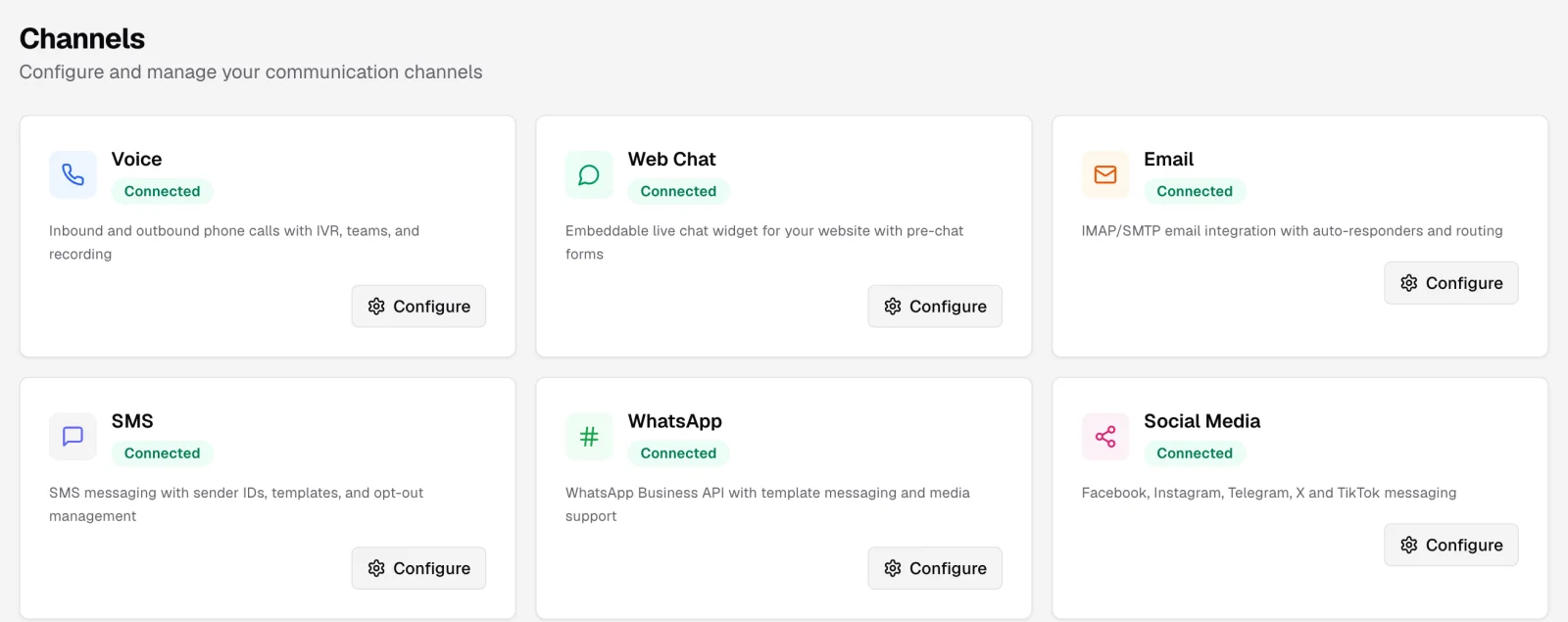
Connect the channels you need now and add the others later. Each new channel joins the same inbox, routing and reports.
Voice
Inbound and outbound calls in the browser softphone, with IVR call flows, teams and call recording.
Web chat
A chat widget for your website, with a pre-chat form, file sharing, an offline message and business hours. The widget speaks English, Turkish, French and Arabic.
Connect any mailbox over IMAP and SMTP. New mail arrives as a conversation, replies stay in the thread, and an auto-responder can answer first.
SMS
Two-way SMS with sender IDs and templates. Opt-out keywords such as STOP add the number to your do-not-contact list.
WhatsApp Business
Connect through Meta Cloud API, 360dialog, MessageBird or Azure. Send approved templates, and reply freely inside the 24-hour customer-service window.
Social messaging
Direct messages from Facebook Messenger, Instagram, Telegram, TikTok and X arrive in the same inbox.
Video calls
Move a conversation to a browser video call with screen sharing and recording.
One inbox for every customer conversation
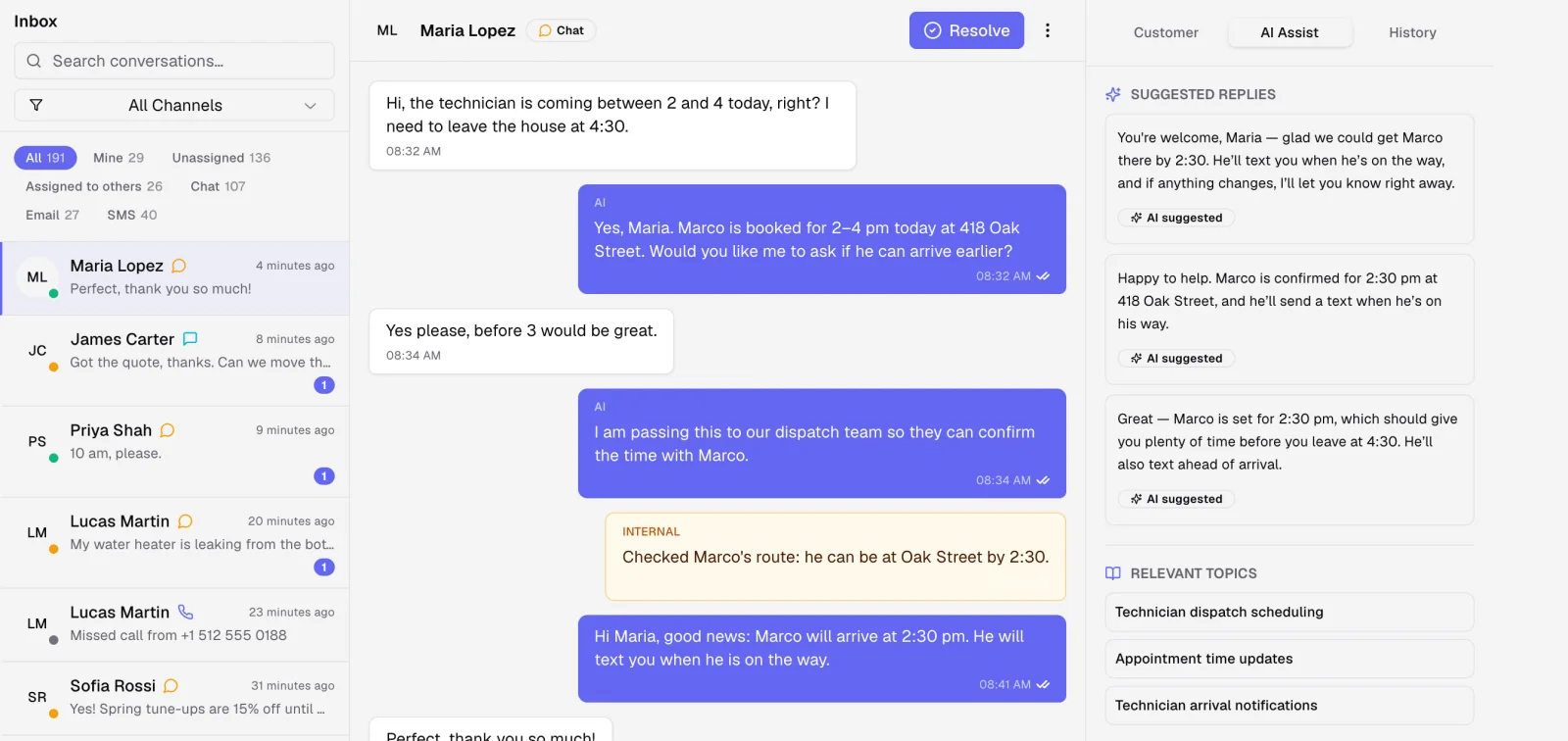
Agents work every channel from one conversation list, with the customer's profile and history beside the message.
One conversation list
Filter by channel, by your own conversations or by unassigned ones. Each row shows the channel, the status and the agent who owns it.
Contacts matched across channels
A message from a known phone number or email address joins the existing contact. Vomenta finds duplicate contacts, and a merge keeps every channel of both.
One customer timeline
Each contact shows its calls, chats, emails and notes in time order, so agents read the history before they reply.
Assign, transfer and resolve
Assign a conversation, transfer it to another agent or team, resolve it and reopen it. Bulk actions handle many conversations at once.
Canned responses and internal notes
Insert saved replies, add notes that only your team sees, and send files and images.
Delivery status
Outbound messages show sent, delivered, read and failed states. A failed message shows the reason from the provider.
AI that answers first and hands off to your team
Put a bot or AI replies on any messaging channel. When the customer needs a person, the conversation moves to your team with its history.
More about AI voice agents →A bot on every messaging channel
Build a flow on a canvas and attach it to web chat, SMS, email, WhatsApp or a social channel. Flows ask questions, call your APIs, tag contacts and book callbacks.
AI replies for each channel
Turn on AI replies for a channel and choose the tone. The AI answers in the customer's conversation, with the contact's earlier messages as context.
Answers from your knowledge base
Bot flows and the web chat AI answer from your own articles and documents.
Handoff to a person
When the customer asks for a person, or the AI cannot help, the conversation moves to your team. The agent sees everything the customer already wrote.
Agent Copilot
With the Copilot module, each conversation gets suggested replies, a summary, the customer's sentiment, a next step and answers drawn from your knowledge base. How Copilot and live coaching assist agents →
Route every conversation to the right team
Calls and messages share the same teams, routing strategies and agent availability.
10 routing strategies
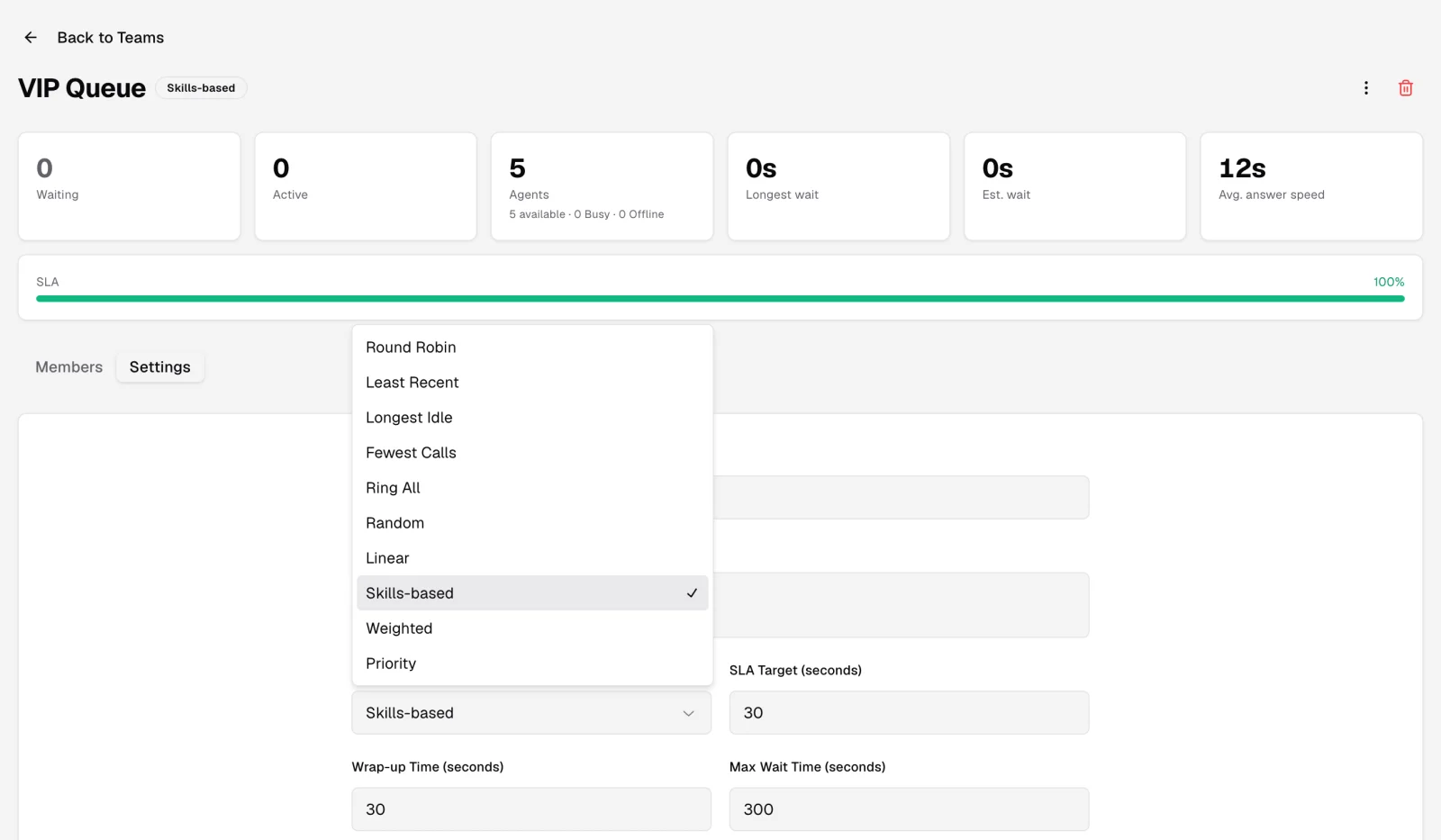
Round robin, least recent, longest idle, fewest calls, ring all, random, linear, skills-based, weighted and priority.
Only to available agents
Conversations go only to agents who are online and have room for another chat.
SLA targets for each channel
Set first-response and resolution targets for each channel. Vomenta raises a warning at 80% of the target and a breach alert when the target is missed.
Calls that continue as messages
Voice is part of the same platform, so a call can lead to a text and a chat can lead to a call.
Text the caller during the call
The AI voice agent sends an SMS, a WhatsApp message or an email while the caller is still on the line, for example a confirmation or a link.
Missed call text back
An automation rule sends an SMS or a WhatsApp message when a call is missed. The customer replies in writing, and the reply arrives in the same inbox.
Callback from a chat
A bot flow books a callback, and the platform calls the customer at the agreed time.
AI answering service by industry
- HVAC answering service
- Plumbing answering service
- Construction answering service
- Pest control answering service
- Legal answering service
- Accounting answering service
- Insurance answering service
- Real estate answering service
- Property management answering service
- Medical office answering service
- Dental answering service
- Chiropractic answering service
- Funeral home answering service
- All industries
Omnichannel reporting in one place
Compare the channels side by side, and follow live work across calls and conversations.
More about reporting →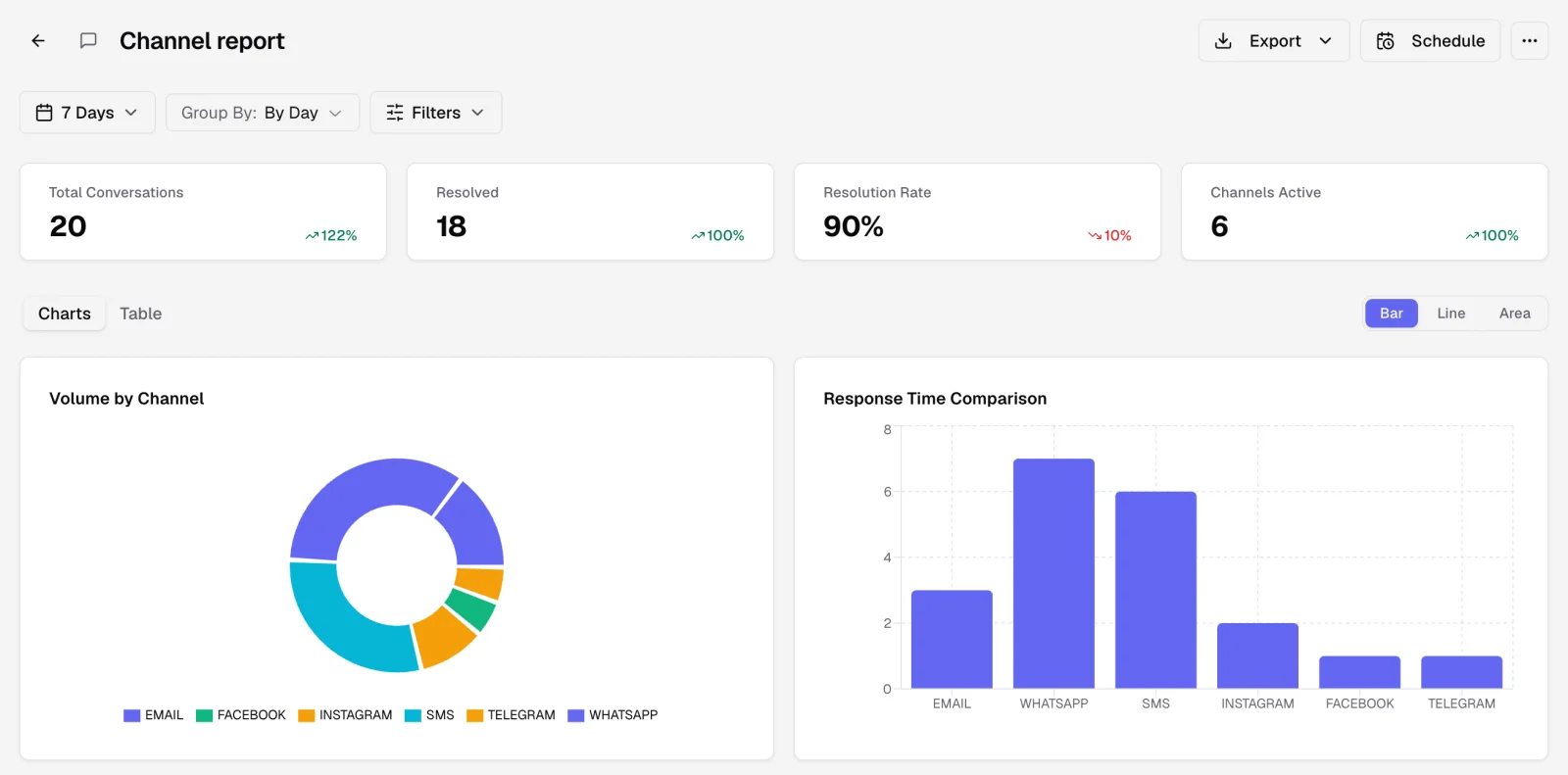
Channel report
Volume, resolution rate, first-response time and resolution time for each channel, compared in one report.
Live interactions board
Supervisors see active calls and conversations together, and filter them by channel, team or agent.
Export and schedule
Export a report to CSV, Excel or PDF, or email it on a schedule you set.
Connect the inbox to your CRM and helpdesk
Bot flows and AI agents read and update the tools your teams already use, and webhooks keep your other systems in step.
See all integrations →CRM and helpdesk
Salesforce, HubSpot, Zoho CRM, Zendesk, Freshdesk, Zoho Desk and Jira.
Team chat
Post to Slack, Microsoft Teams or Zoho Cliq from bot flows and AI agents.
Webhooks
Receive an event when a conversation starts or is resolved, and when a message is sent or received.
REST API
Connect your own systems to the public REST API with API keys.
Messaging that respects consent
Opt-outs, consent checks and retention rules apply to every conversation automatically.
More about security →Opt-out keywords
STOP, UNSUBSCRIBE and your own keywords add the sender to the do-not-contact list and send a confirmation.
Checks before each SMS
Outbound SMS checks the do-not-contact list and the recorded consent first. For Turkey, it also checks the İYS registry.
The WhatsApp 24-hour window
Free-form replies stay inside the 24-hour customer-service window. Outside it, you send an approved template.
Retention and data requests
Set how long chat history is kept, and export or delete a contact's data when they ask under GDPR or KVKK.
Omnichannel pricing per agent
Voice and web chat are in every plan. Add each other channel as a module, and pay for messages as you send them.
Plans from
WhatsApp module
WhatsApp session message
One Starter seat with WhatsApp is $49 per month, plus messages.
Omnichannel contact center: common questions
What is an omnichannel contact center?
An omnichannel contact center handles phone calls, live chat, email, SMS, WhatsApp and social messages in one system. Agents answer every channel from one inbox, each customer has one history across the channels, and the same routing rules and reports cover all of them. When a customer moves from a call to a message, the next agent sees what already happened.
What is the difference between omnichannel and multichannel?
A multichannel contact center offers several channels, but each channel runs in its own tool with its own history. An omnichannel contact center connects them: one inbox, one customer timeline, and shared routing and reporting. The customer does not repeat the story after a change of channel.
Which channels does Vomenta support?
Phone calls, web chat, email over IMAP and SMTP, SMS, WhatsApp Business, direct messages from Facebook Messenger, Instagram, Telegram, TikTok and X, and browser video calls. Public posts and comments on social networks are not part of the inbox.
How do I connect WhatsApp Business?
Connect a WhatsApp Business number through Meta Cloud API, 360dialog, MessageBird or Azure. You create and send approved message templates from Vomenta. Replies inside the 24-hour customer-service window are free-form, and messages outside it use a template.
Can AI answer WhatsApp, SMS and chat messages?
Yes. Attach a bot flow to a channel or turn on AI replies for it. Bot flows answer from your knowledge base, collect details and call your APIs. When the customer asks for a person, or the AI cannot help, the conversation moves to your team.
Do calls and messages share one customer history?
Yes. Vomenta matches each message to a contact by phone number or email address, and the contact timeline shows calls, chats, emails and notes in time order.
Can I send a text after a missed call?
Yes. An automation rule reacts to a missed or unanswered call and sends an SMS or a WhatsApp message to the caller. The reply arrives in the same inbox.
How much does omnichannel contact center software cost?
In Vomenta, plans start at $29 per agent per month and include voice and web chat. Each other channel is a module priced per agent per month: email $10, SMS $15, WhatsApp $20 and social messaging $15. Messages are metered: SMS 2¢ per segment, and WhatsApp 1¢ per session message or 8¢ per template message.
Is Vomenta HIPAA compliant?
No. Vomenta does not offer a HIPAA business associate agreement today. Do not send protected health information through its channels until a HIPAA program exists.
Is there a free trial?
Yes. The 14-day free trial includes $25 of usage credit and needs no credit card.
Answer every channel from one inbox.
Create a workspace, connect your first channel and let AI answer first. Or walk through your channels with a specialist.
14-day free trial · $25 usage credit · No credit card required