Call center dialer: how preview, progressive, power and predictive dialing work, and what it costs
A call center dialer places outbound calls from a contact list and connects the answered ones to your agents. This page explains the five dialing modes, the pacing math behind them, the compliance checks that run before every dial, and the price. Vomenta is the worked example: its dialer runs on the same platform as your inbound queues and your AI agents.
14-day free trial · $25 usage credit · No credit card required
- dialing modes, from preview to predictive
- 5
- abandon-rate target the predictive mode paces to
- 3%
- per agent per month for the Outbound campaigns module
- $20
- per outbound minute, billed on answered calls
- 3¢
What is a call center dialer?
A call center dialer is software that calls numbers from a contact list on behalf of agents. Depending on the mode, the agent starts each call, or the dialer places calls on its own and passes the answered ones to whoever is free. The dialer also skips do-not-call numbers, keeps to legal calling hours, retries busy numbers and records the outcome of every attempt.
The Vomenta dialer is part of a cloud contact center (CCaaS), next to the inbound queues and the AI call center. The rest of this page uses it as the example, with the limits and prices that apply today.
The five types of call center dialer
The modes differ in one thing: who decides when the next call is placed, the agent or the dialer. Everything else follows from that.
Predictive mode in depth: the formula and a pacing calculator →| How it dials | Lines per free agent | Best for | In Vomenta | |
|---|---|---|---|---|
| Preview | How it dialsThe agent reads the contact's record, then presses Call. Nothing dials by itself. | Lines per free agent0 until the agent dials | Best forComplex accounts, collections, B2B lists where the agent needs the history first. | In VomentaCampaign mode, and the agent's personal dialer with call lists. |
| Click-to-call | How it dialsThe agent clicks a number in a record, a conversation or a list and the softphone dials it. | Lines per free agent0 until the agent clicks | Best forCallbacks, follow-ups and any call that starts from the customer's record. | In VomentaEverywhere a phone number is shown in the app. |
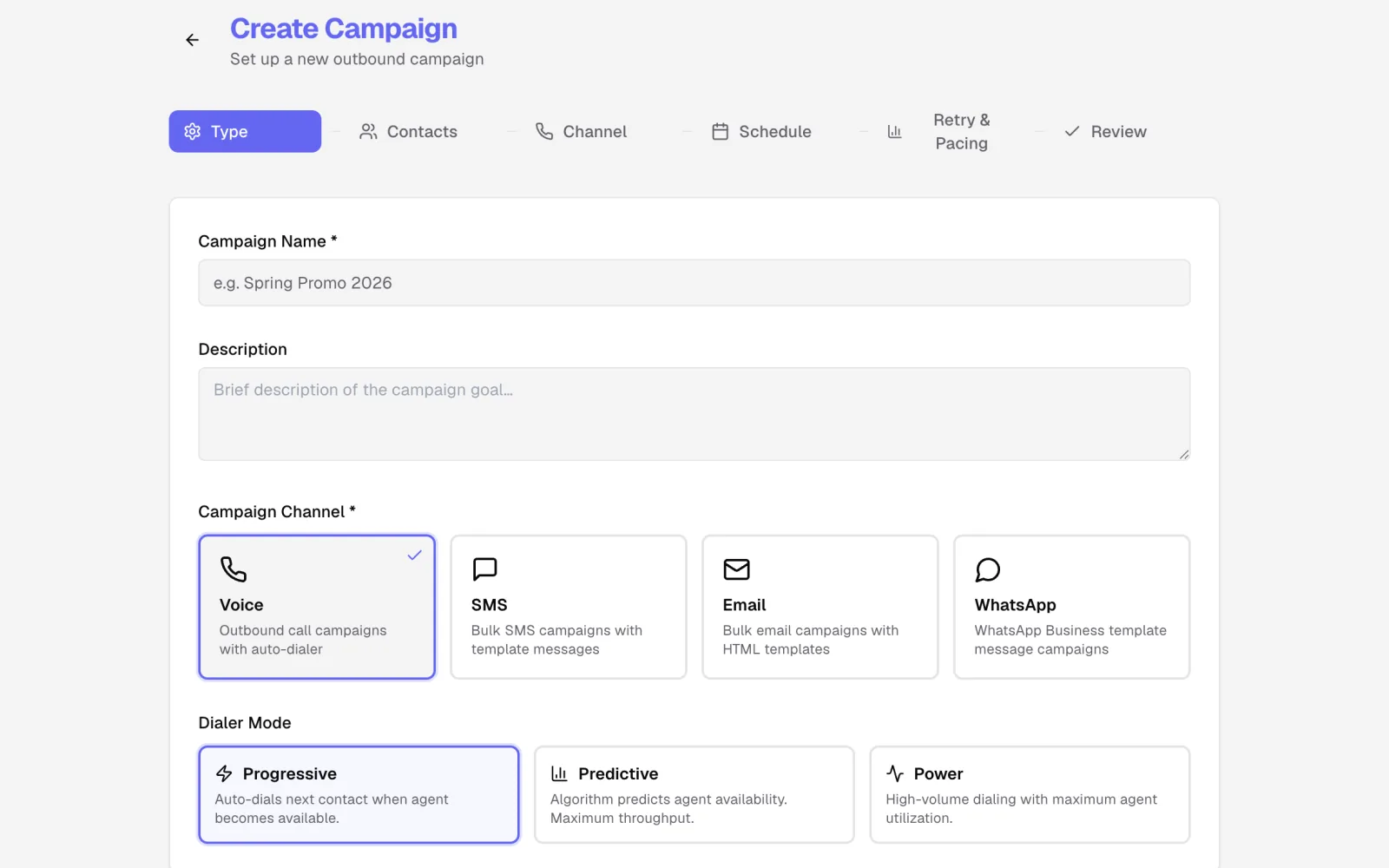
| Progressive | How it dialsThe dialer places one call per free agent and routes the answered call to the team's next free agent. | Lines per free agent1 | Best forTeams that want no abandoned calls and no idle time between calls. | In VomentaThe default mode for a new voice campaign. |
| Power | How it dialsThe dialer places several lines per free agent. The first answered call connects, the rest are retried later. | Lines per free agent1 to 5, set per campaign | Best forLists with low answer rates, such as cold outreach and lead follow-up. | In VomentaLines per agent is the campaign's pace setting. |
| Predictive | How it dialsThe dialer computes how many calls to place so that an agent is free when a call is answered, and stays under an abandon-rate target. | Lines per free agentComputed, up to 10 | Best forLarge lists and teams of five or more agents, where the statistics are stable. | In VomentaPaces to a 3% abandon-rate target from the campaign's own answer rate and talk time. |
One page per auto-dial mode: predictive dialer, progressive dialer and power dialer.
How the dialer decides how many calls to place
The pace is recalculated every minute from the agents who are free and the campaign's own results. These are the rules in the code, not a sales description.
- 01
Count the agents who are free
Every minute the dialer counts the agents in the campaign's team whose status is Available. If nobody is free, nothing dials. Dialing into an empty team would abandon every answered call.
- 02
Progressive: one line per free agent
Three free agents means three calls in flight. An answered call rings the team through its routing strategy, so a person is free when someone picks up.
- 03
Power: 1 to 5 lines per free agent
You set the lines per agent on the campaign. Three free agents at two lines means six calls in flight. The first call that is answered connects. If two are answered at once, the second waits in the campaign's queue.
- 04
Predictive: lines computed from the campaign's own numbers
The dialer takes the campaign's answer rate so far (it assumes 50% until the first calls land, and never less than 10%), divides the free agents by it, and multiplies by 97% to stay under the 3% abandon target. Calls that run longer than the 2-minute baseline reduce the pace, shorter calls raise it, within a factor of 0.5 to 2. The result is never below one line per agent and never above 10.
- 05
AI agents: pace by concurrency, not by people
When an AI voice agent works the campaign, the pace setting is the number of AI calls allowed at once, minus the calls still in flight, within the AI call ceiling of your account. Human availability does not gate the dial, so the AI can call while your team is busy.
- 06
Retry and move on
Busy and unanswered numbers go back into the list after the retry interval (60 minutes by default) until they reach the attempt limit (3 by default). The dialer then marks the contact as not reached and the report shows why.
Why a running campaign is quiet. When a campaign is running and silent, the campaign screen shows the reason: the mode waits for an agent to dial, no agent is free, every remaining contact is inside its retry interval, every remaining number is on the do-not-call list or invalid, or the account ran out of balance and the dialer paused the campaign itself.
- Progressive
- 4 lines
- Power
- 8 lines
- Predictive
- 7 lines
1 line per free agent
2 lines per free agent, set on the campaign
60% answer rate, 3% abandon target, 2-minute calls
Solid lines ring for an agent who is free now. Lighter lines overlap the rings, so a person is free by the time someone answers.
What runs before every dial
Each check is a campaign setting or a rule of the platform, so an agent cannot forget it and a list cannot bypass it.
More about security and data →Calling hours
Voice campaigns dial only between 8:00 to 21:00 in your account's time zone, and only on the days and hours you set on the campaign. A campaign started outside the window waits for it. A scheduled campaign starts by itself when the window opens.
Do-not-call list
Before each batch is placed, every number is checked against your do-not-call list. A listed number is skipped, never dialed, and the contact is marked as do-not-call in the campaign report. The agent's call screen shows a do-not-call badge when the person on the line is listed.
İYS consent for Turkey
With the İYS integration connected, a campaign checks the consent registry before it calls or texts a Turkish number. A number without consent is blocked for good in that campaign and is never retried.
Caller ID you own
A campaign can only present a number that belongs to your account and has passed the ownership review. The check runs when you save, start and resume the campaign, so a released or rejected number fails once with a clear message instead of failing every dial. Numbers come from the app in 32 countries or over your own SIP trunk.
Attempt limits and retry intervals
Each contact is dialed at most the number of times you set, 3 by default, and not again before the retry interval has passed. Invalid numbers are skipped and reported, not retried.
A balance check before every start
A campaign does not start or resume without balance to pay for it. If the balance runs out mid-run, the dialer pauses the campaign itself and says so. A campaign a person paused never restarts by itself.
Recording with consent and a disposition per call
Calls are recorded under the recording rules of your team, with a pause for sensitive input. Each dialed call ends with a disposition code and notes, so the campaign report shows what happened to every contact.
An AI voice agent works the list, your team takes the qualified calls
The AI agent and the human team share the campaign, the call and the report. The handoff happens inside the same call.
More about AI voice agents →The AI takes the first seconds
Assign an AI voice agent to the campaign instead of, or next to, a human team. The agent delivers the reminder, asks the qualifying questions, confirms the appointment or takes the survey answer, and writes the outcome to the contact.
Qualified contacts ring your team in the same call
When the person on the line asks for a human, or the agent's instructions say the call type needs one, the agent transfers the live call to the human team you chose. The person who answers sees the transcript. The AI keeps the caller company while the phones ring.
Pace and spend are capped
The campaign's pace setting caps concurrent AI calls, your account has an AI call ceiling, and each AI provider has a monthly spend cap. A runaway list cannot run away.
What it does not do yet
The dialer detects an answering machine and hangs up on voicemail. The attempt is recorded as voicemail, and the contact is retried under the campaign's retry rules. It does not leave a message yet.
- ToolDial +1 415 … · answered after 6 s
- AI agent“Hi, this is the reminder line for Bright Smile Dental. You have a cleaning on Thursday at 10. Does that still work?”
- Caller“No, I need to move it. And I have a question about my last bill.”
- ToolLook up appointment slots · Reschedule to Friday 14:00 · Send SMS confirmation
- AI agent“Done, Friday at 2 p.m., and the confirmation is on its way by text. For the bill I'll bring in the front desk now.”
- ToolTransfer to the front-desk team
- TeamA receptionist answers in the app with the transcript and the new appointment on screen
The agent's own dialer: call lists in the workspace
Not every outbound job is a campaign. A collections agent, a sales rep or a receptionist with callbacks works a list at their own pace, from the same softphone.
Call lists, not campaigns
A supervisor uploads a CSV or picks a contact group and assigns it to one agent or to a whole team. Agents can also build their own lists. Each list carries a briefing that the agent sees on every call: why we are calling these people.
One record at a time, from a shared pool
When a list is shared, Continue hands the agent the next uncalled record and locks it, so two agents never call the same person. A record left open is released again after ten minutes.
Continue by hand or on a timer
After wrap-up the agent presses Continue, or sets the list to continue by itself after 3, 5, 10, 15 seconds. The countdown starts only when wrap-up ends, so a note is never cut short.
Retry later, skip, complete
After each call the agent marks the record complete, skips it, or schedules a retry in 30 minutes, 2 hours, tomorrow, at a chosen time, or at the end of the list. Every attempt is kept with its outcome, disposition and note.
The same retry rules as campaigns
Each list has its own attempt limit and retry interval. Records on cooldown are held back and the dialer shows how many are waiting and when the next one becomes eligible.
The softphone the agent already uses
The personal dialer runs in the agent workspace next to the inbox, the contact record and the live notes. Inbound calls, callbacks and list calls share one call screen and one wrap-up form.
How much a call center dialer costs
A module per agent, a seat per agent, and outbound minutes on answered calls. Every rate is published.
Every plan, module and usage rate →Outbound campaigns
Outbound calls
Seat
Worked example: 10 agents, 30,000 outbound minutes, 2 caller-ID numbers
- 10 Starter seats × $29
- $290
- Outbound campaigns on 10 seats × $20
- $200
- 30,000 outbound minutes × 3¢
- $900
- 2 local numbers × about $2
- $4
- Per month
- $1,394
Outbound rates can differ by destination country. Annual billing is 20% less on the seats. An AI agent on the campaign needs the AI Voice Agent module at $35 per seat plus AI usage.
Run your own list through the numbers
Dials and conversations per day for your team and mode, and the monthly cost in Vomenta. An estimate from averages, not a quote.
- Dials per day
- 1,077
- Conversations per day
- 377
- 5 seats with the outbound module
- $245
- 23,751 outbound minutes at 3¢
- $712.53
Assumes 1 minute of wrap-up per conversation, 25 seconds per unanswered ring and 21 dialing days a month. Starter seats, monthly billing. Caller-ID numbers, AI agents and sales tax or VAT are added where they apply.
How to choose a call center dialer: eight questions
Vendor lists go out of date. These questions do not. Ask each vendor all eight and compare the answers side by side.
- 01
Which modes does it have, and can you change the mode per campaign?
A vendor with only a power dialer sells every list as a power list. Ask for preview, progressive, power and predictive, and for a personal dialer the agent runs from a list.
- 02
What runs before each dial?
Ask to see the do-not-call check, the calling-hours rule, the attempt limit and the consent check in the campaign settings, not in a compliance PDF.
- 03
Whose numbers appear as caller ID?
A dialer that lets you type any number as caller ID will get your numbers flagged as spam. Caller ID should be limited to numbers you own and the vendor has verified.
- 04
What happens to the agent between calls?
Look at the wrap-up screen, the disposition list and the time to the next call. Idle time between calls is where the capacity goes.
- 05
Can an AI agent work the list, and hand over to a person?
If the AI comes from a second vendor, a qualified lead is a blind transfer to a number. Ask to see a live call move from the AI to a person with the transcript.
- 06
Does the dialer share the platform with inbound?
A separate dialer means separate seats, separate reports and separate recordings. Blended teams need one softphone, one contact record and one report for both directions.
- 07
What does a minute cost, and what does an unanswered dial cost?
Ask for the per-minute rate per destination and whether unanswered dials are billed. Then run your own list size through the numbers before you sign.
- 08
Can you try it with your own list?
A trial that needs no card and includes usage credit lets you upload a hundred contacts and watch the pace. Vomenta's trial lasts 14 days with $25 of credit.
Call center dialer: common questions
What is a call center dialer?
A call center dialer is software that calls numbers from a contact list on behalf of agents. Depending on the mode, the agent starts each call, or the dialer places calls on its own and passes the answered ones to whoever is free. The dialer also skips do-not-call numbers, keeps to legal calling hours, retries busy numbers and records the outcome of every attempt.
How does a dialer work in a call center?
The dialer reads the campaign's contact list, drops the numbers that are on the do-not-call list or outside calling hours, and places calls at a pace set by the mode. In progressive mode it places one call per free agent. In power mode it places 1 to 5 lines per free agent. In predictive mode it computes the number of lines from the answer rate and the talk time so that an agent is free when someone answers. An answered call rings the agent's softphone with the contact's record on screen. Busy and unanswered numbers are retried after an interval, up to the attempt limit.
Which dialer is best for a call center?
It depends on the list and the team. Preview for accounts where the agent must read the history first. Progressive for teams that want no abandoned calls. Power for lists with low answer rates and a small team. Predictive for large lists and five or more agents, where the answer rate is stable enough to pace on. A platform that offers all of them lets you pick per campaign instead of per vendor.
What is the best auto dialer for call centers?
Judge an auto dialer on four things: the modes it offers, the compliance checks that run before every dial (do-not-call, calling hours, consent, caller-ID ownership), what the agent sees between calls, and whether it shares the platform with your inbound calls and your AI agents. Vomenta offers preview, click-to-call, progressive, power and predictive dialing on the same platform as its queues, recordings and AI voice agents.
What is the difference between predictive, power and progressive dialers?
Progressive places one call per free agent, so nobody is abandoned but the agent waits through each ring. Power places a fixed number of lines per free agent, 1 to 5 in Vomenta, which cuts the waiting on low-answer lists but can abandon a call when two people answer at once. Predictive computes the number of lines from the live answer rate and talk time, and paces to an abandon-rate target, 3% in Vomenta. It gives the most talk time per agent on large lists and the least control on small ones.
How much does a dialer system for call centers cost?
Most vendors price a dialer as a per-agent add-on plus minutes. In Vomenta the Outbound campaigns module is $20 per agent per month on top of a seat from $29, and outbound calls are 3¢ per minute on answered calls. A 10-agent team with 30,000 outbound minutes and 2 caller-ID numbers pays about $1,394 a month. The estimator above runs your own numbers.
Is the dialer TCPA compliant?
Compliance is a property of your campaign, not of a product, but the controls are built in: voice campaigns only dial between 8:00 to 21:00 in your time zone, numbers on your do-not-call list are never dialed, each contact has an attempt limit, caller ID is limited to numbers you own, and the predictive mode paces to a 3% abandon-rate target. Consent for the numbers on your list, and state-level rules, remain your responsibility.
Does the dialer detect answering machines?
Yes. On every voice campaign, in progressive, power and predictive mode and on AI-agent campaigns, the dialer detects an answering machine from the first stretch of audio after the call connects. On a machine the call hangs up. The attempt is recorded as voicemail, not as an answered call, and the contact is retried under the campaign's retry rules. It does not leave a message yet. Detection is on by default in the campaign wizard.
Can I use my own phone numbers as caller ID?
Yes. Buy numbers in the app in 32 countries, port the numbers you have, or register them over your carrier's SIP trunk. A campaign can present any number your account owns once its ownership review is complete. It cannot present a number you do not own.
Can an AI voice agent run the dialer?
Yes. Assign an AI voice agent to a voice campaign. The agent delivers the message, asks the questions and writes the outcome to the contact. When a person is needed, it transfers the live call to the human team you chose, with the transcript. The pace setting caps how many AI calls run at once.
Do I need a separate dialer vendor?
Not with Vomenta. The dialer, the inbound queues, the softphone, the recordings, the contact records and the reports are one platform, so a blended agent takes a queue call and a list call on the same screen and the report covers both.
Is there a free trial?
Yes. The 14-day free trial includes $25 of usage credit and the outbound module, needs no credit card, and lets you upload a list and run a campaign in every mode.
Upload a list and watch the pace.
Create a workspace, import a hundred contacts and run a campaign in every mode. Or walk through your lists, your hours and your handoff rules with a specialist.
14-day free trial · $25 usage credit · No credit card required