Contact center software features for voice, chat and AI
Vomenta puts call routing, visual call flows, an omnichannel inbox, chatbots, AI agents, a predictive dialer, live monitoring, quality scoring and workforce tools in one platform. Turn on the modules you need and pay per agent.
14-day free trial · $25 usage credit · No credit card required
- call routing strategies
- 10
- call flow building blocks
- 22
- chatbot node types
- 32
- report templates
- 29
Inbound call routing and a browser softphone
Calls reach the right team through automatic call distribution, and agents answer in the browser without a desk phone.
How calls are routed: 10 strategies, skills and overflow →Automatic call distribution (ACD)
Choose from 10 routing strategies, including round robin, longest idle, fewest calls, weighted and priority. Set a maximum queue size for each team.
Skills-based routing
Give each team the skills it needs and each agent the skills they have. Calls go to the agents who match.
Overflow and scheduled callbacks
When no agent is free, send the call to voicemail, to another team or to a closing message. Callers can book a callback, and the platform dials it at the agreed time.
WebRTC softphone
Agents answer, hold, mute, transfer and conference calls in the browser. Click-to-call dials a customer straight from the contact record.
Call recording
Record calls, pause the recording while a customer reads out card details, and decide who may play or download each recording.
Wrap-up and dispositions
Agents close each call with a disposition code and notes, so reports show why customers called and how each call ended.
Phone numbers and BYOC
Buy numbers in the app from our stock in 34 countries, or bring your own carrier over a SIP trunk. Paperwork handled in 32 countries. Countries, paperwork and how to buy a number →
IVR software you build with drag and drop
Design the phone menu on a canvas. Operations teams change greetings, menus and routing without waiting for a developer.
How the AI IVR builder works: spoken intent, templates and test calls →22 building blocks
Play audio or text-to-speech, collect keypad or speech input, let callers pick a language, check business hours, call an HTTP endpoint, send a message, run a survey, and route to a team, an agent or an AI agent.
Speech intent routing
Callers say what they need. The flow turns speech into text, matches it to the intents you define and sends the call down the right branch.
Versions and rollback
Each publish keeps a version of the flow, and you can roll back to an earlier version in one step.
Simulator and test calls
Walk through the flow in a simulator, or place a real test call before customers reach it.
Templates
Start from a template or clone an existing flow instead of building every menu from an empty canvas.
Every channel in one agent inbox
Agents answer chat, email, SMS, WhatsApp and social messages from one list, with the customer's history beside the conversation.
More about the omnichannel inbox →Digital channels
Web chat widget, email over SMTP and IMAP, SMS, WhatsApp Business, Facebook Messenger, Instagram, Telegram, TikTok, LINE and X.
Unified inbox
One conversation list for every channel, with a filter for each channel when a team works only one of them.
Customer timeline
Each contact shows its conversations, calls and notes in time order, whatever channel they came from.
Video calls
Send a customer a link to a browser video call, with screen sharing and recording.
AI replies per channel
Turn on AI replies for a channel, choose the tone, and hand the conversation to an agent after a set number of turns or when the customer asks for a person.
A no-code chatbot builder for every messaging channel
Build bots on a canvas, answer from your own knowledge base, and pass the conversation to a person when it needs one.
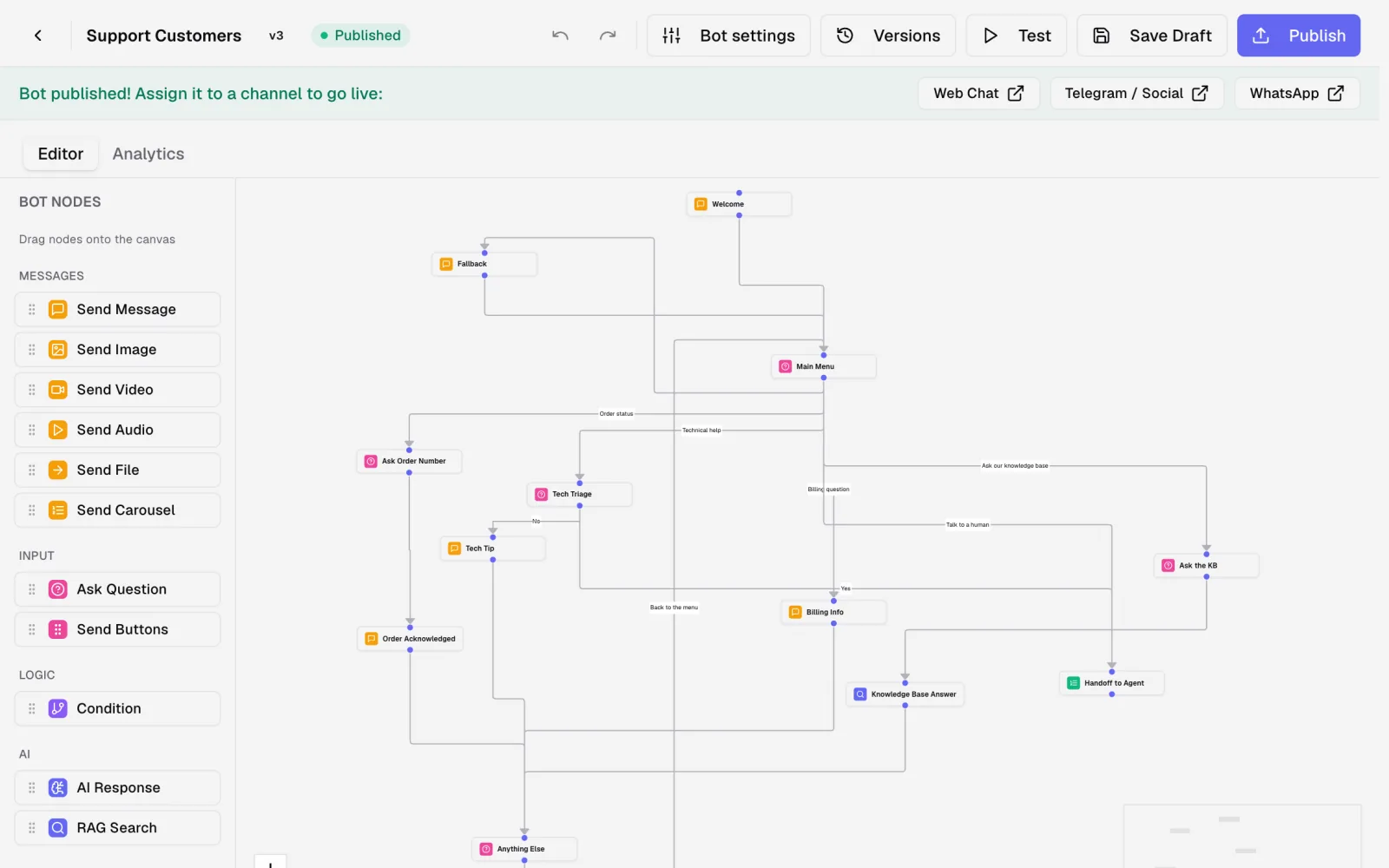
32 node types
Send text, images, files, buttons and carousels, ask questions, branch on conditions, call APIs and webhooks, tag contacts and run integration actions.
Answers from your knowledge base
Upload PDF, DOCX, text and Markdown files or write articles. The bot searches them and answers from what it finds.
Human handoff
Transfer to a named agent or to a team. The agent continues the same conversation, with the details the bot collected.
Versions, templates and analytics
Publish versions and roll back, start from 12 templates, and see the completion rate and the step where users drop off.
Deploy on any messaging channel
Attach a bot to web chat, SMS, email, WhatsApp, Messenger, Instagram, Telegram, LINE, TikTok or X.
Bring your own AI key
Use OpenAI, Anthropic, Google Gemini, DeepSeek, xAI Grok, Moonshot Kimi, Qwen through Novita or a self-hosted OpenAI-compatible model with your own key, or use the platform's keys.
AI voice agents and real-time agent assist
AI agents handle routine calls from start to finish. Copilot helps human agents during and after each conversation.
More about AI voice agents →AI voice agents
Answer and place calls in more than 30 languages, with realtime speech models from OpenAI, Google Gemini, xAI or Qwen, or a speech-to-text, LLM and text-to-speech pipeline.
Tools and escalation
AI agents look up data and take actions through HTTP, built-in and integration tools, and escalate to a human team when the caller needs one. How a greeter routes to specialist agents and people →
Suggested replies and next best action
Copilot reads the conversation and suggests replies, a next step and answers drawn from your knowledge base. More about agent assist →
AI call summaries
Each call ends with a generated summary on the wrap-up screen, so agents do not write notes from memory. More about call transcription →
Live coaching
During a call, the live coach checks the conversation against your scorecard rules and shows alerts in the agent's softphone.
Predictive, power and progressive dialing
Run outbound voice, SMS, email and WhatsApp campaigns from the same platform as your inbound work.
How each dialing mode paces and what it costs →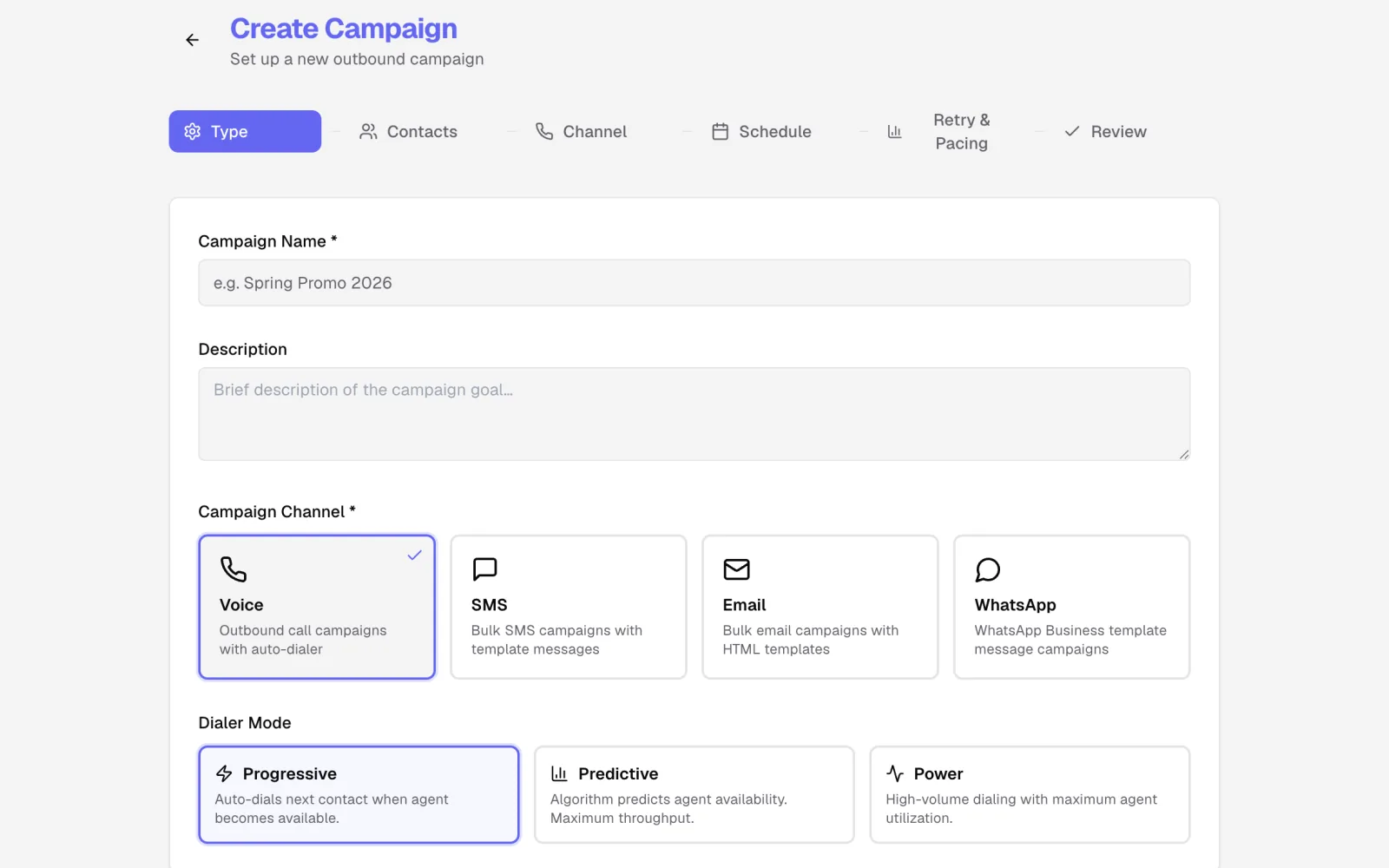
Three dialing modes
Choose predictive, power or progressive dialing for each campaign. Predictive mode adjusts the pace to the answer rate and talk time, with a 3% abandon-rate target. More about outbound campaigns →
AI agents on outbound calls
Assign an AI voice agent to a voice campaign, for reminders, surveys and qualification calls. The dialer detects an answering machine and hangs up on voicemail. It does not leave a message yet. More about AI outbound calls →
Do-not-call lists and calling hours
Numbers on your do-not-call list are skipped, and calls stay inside the calling window you set for the campaign.
İYS consent checks
For Turkey, voice and SMS campaigns check consent in the İYS registry before they contact a number.
Call outcomes
Agents log a disposition for each dialed call, so campaign reports show what happened to every contact.
Call center monitoring in real time
Supervisors see every live call, queue and agent state, and step in when a call needs help.
Live KPIs, listen, barge, takeover and the wallboard link →Listen, barge and take over
Join a live call silently, speak to both the agent and the customer, or take the call over from the agent.
Live transcript
On calls with live coaching on, read the conversation while it happens before you decide to step in.
Agent status control
See who is available, busy or in wrap-up, and change an agent's status from the monitoring screen.
Wallboards
Show live queue and agent figures on a wall screen through a read-only share link that you can revoke.
Contact center quality management with AI scoring
Score conversations against your own scorecards and turn the results into coaching.
How AI scoring, scorecards and supervisor reviews work →Weighted scorecards
Define the criteria, their weights and a passing score, and choose which teams and channels each scorecard covers.
Automatic AI scoring of calls
With AI Copilot or AI Supervisor turned on, every agent call that has a transcript is scored against its scorecard.
Chat and email reviews
Supervisors evaluate chats and emails against the same scorecards, and can ask AI to score a chat.
Coaching
Review each agent's evaluations in one place and agree on what to work on next.
CSAT surveys
Ask for a 1–5 rating when a chat is resolved, and add a survey step at the end of a call flow.
Workforce management for call center teams
Plan shifts from your real call volume and see how the day follows the plan.
How the Erlang C forecast, shifts and adherence work →Erlang C forecast
Forecast the agents you need for each hour, based on the last 28 days of call volume and handle time.
Shift scheduling
Create shifts with breaks for each agent, then publish the schedule to the team.
Adherence
Compare each agent's status with the schedule and keep a daily adherence history.
Time off
Agents request time off and supervisors approve it next to the schedule.
Gamification
Badges and a leaderboard reward the results you choose to recognize.
Call center reporting and analytics
Ready-made reports for every part of the operation, delivered the way each team reads them.
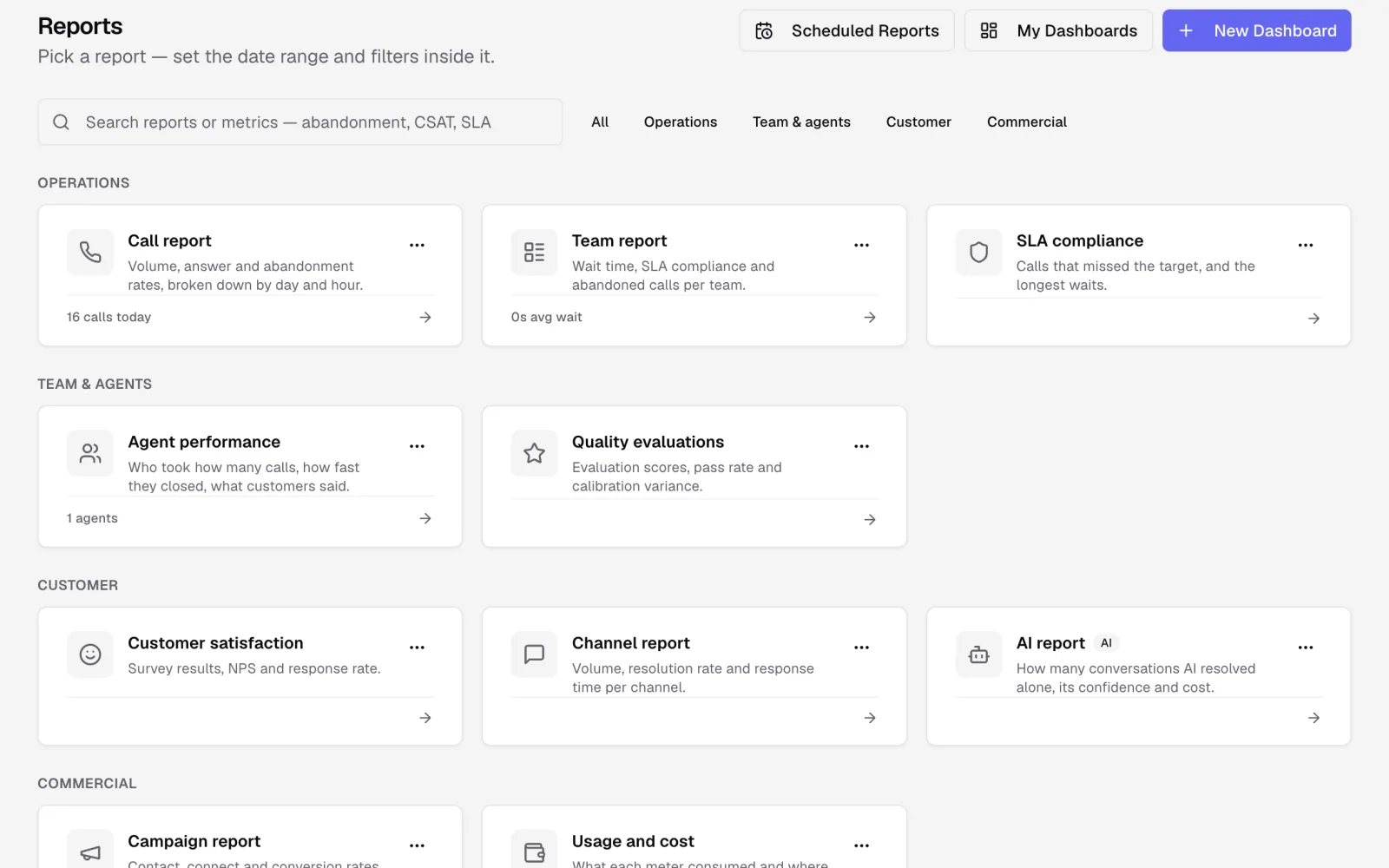
29 report templates
Reports on calls, agents, teams, campaigns, channels, AI, quality and customer satisfaction.
Export and schedule
Export any report to CSV, Excel or PDF, or email it on a schedule you set.
Event analytics
Call, agent, campaign and message events stream into ClickHouse for fast analysis over long periods.
CRM, helpdesk and developer integrations
Connect conversations to the tools your teams already use, or build on the API.
More about integrations →CRM and helpdesk
Salesforce, HubSpot, Zoho CRM, Zendesk, Freshdesk, Zoho Desk and Jira.
Team chat and recruiting
Slack, Microsoft Teams, Zoho Cliq and Zoho Recruit.
Custom HTTP actions
Call any REST API from call flows, bots, AI agents and automation rules.
REST API and webhooks
A public REST API with API keys, and 30 webhook events signed with HMAC and retried when delivery fails.
MCP server
Connect AI assistants to your workspace through an MCP server with 100+ tools.
Automation rules
Add tags, send messages, call webhooks and update fields when conversation, call, SLA or campaign events occur.
Access control, audit and data protection
Administration and data protection tools are part of every workspace.
More about security →Two-factor authentication
TOTP two-factor authentication that admins can make mandatory, plus a second check before critical actions.
Roles and permissions
Six built-in roles, and custom roles built from 117 permissions.
IP allowlist and sessions
Limit access to your IP ranges, and review or revoke active sessions.
Audit log
Changes to records, settings and billing, data exports, and unmasked recording plays and downloads are logged.
Retention and GDPR/KVKK requests
Set how long each type of data is kept, and handle export, deletion and correction requests for each contact.
Encrypted credentials
Provider keys and connection credentials are stored with AES-256-GCM encryption.
Pay per agent, add the modules you use
Every plan includes the core platform. Channels and AI capabilities are modules priced per agent, and usage is metered. Annual billing saves 20%.
Starter
Professional
Enterprise
Contact center features: common questions
What features does contact center software need?
Most teams need call routing (ACD), an IVR or call flow builder, a softphone, call recording, an inbox for digital channels, real-time monitoring, reporting and CRM integration. Outbound teams also need a dialer, and larger operations add quality management and workforce management. Vomenta includes all of these in one platform.
Does Vomenta include a predictive dialer?
Yes. Outbound campaigns support predictive, power and progressive dialing, with do-not-call lists, calling-hour windows and İYS consent checks for Turkey.
Can I keep my current phone carrier?
Yes. Connect your own SIP trunk, or buy local numbers in the app in 34 countries.
Which AI models can I use?
OpenAI, Anthropic, Google Gemini, DeepSeek, xAI Grok, Moonshot Kimi, Qwen through Novita, or a self-hosted OpenAI-compatible model. Use your own key or the platform's keys.
Do I pay for features I do not use?
No. Plans are priced per agent, and channels and AI capabilities are modules that you turn on when you need them. Usage such as call minutes, messages and AI is metered.
Is there a free trial?
Yes. The 14-day free trial includes $25 of usage credit and needs no credit card.
See how Vomenta fits your operation.
Create a workspace and try every feature, or walk through the platform with a specialist using your own call flows.
14-day free trial · $25 usage credit · No credit card required